UGCFast Editorial Team · English · Published · 9 min read
AI UGC Video Tools Compared: What Will You Still Need to Do?
A convincing presenter is only one part of a product ad. You may also need an accurate product shot, captions, a clear offer, and a version for another market.
That is why two tools advertised as “AI UGC generators” can solve different parts of your problem. One helps turn a product page into a draft. Another gives you control over the presenter. Another lets you finish the edit.
Start with the work you want to remove. Here is a shortlist for five common situations.
| Your situation | Start by looking at | Why it belongs on the shortlist |
|---|---|---|
| You have a product page and need several ad variations | Creatify | Documents URL analysis and batch ad creation. |
| Choosing or creating the presenter is central to the brief | Arcads | Promotes a large actor library and custom actors. |
| You need presenter-led content in several languages | HeyGen | Explicitly combines UGC creation with multilingual delivery. |
| You have product clips and want to control the finished edit | VEED | Documents adding footage, captions and CTAs after generation. |
| You want a short product-led draft with a one-time trial | UGCFast | Offers a product-input workflow and a $1 temporary credit without automatic renewal. |
These are workflow matches, not exclusive capabilities or quality rankings. Source links and the important qualifications appear in each product section below.
Disclosure: UGCFast publishes this guide and is included in it. We reviewed public product information; we did not run a controlled generation test. Official visuals below illustrate the vendors’ offerings, not results we generated.
Jump to: Video formats · The five tools · One-product example · Budget
First, decide what the video needs to show
Before selecting a tool, decide which of these shots your ad needs. They can appear together in the same video.
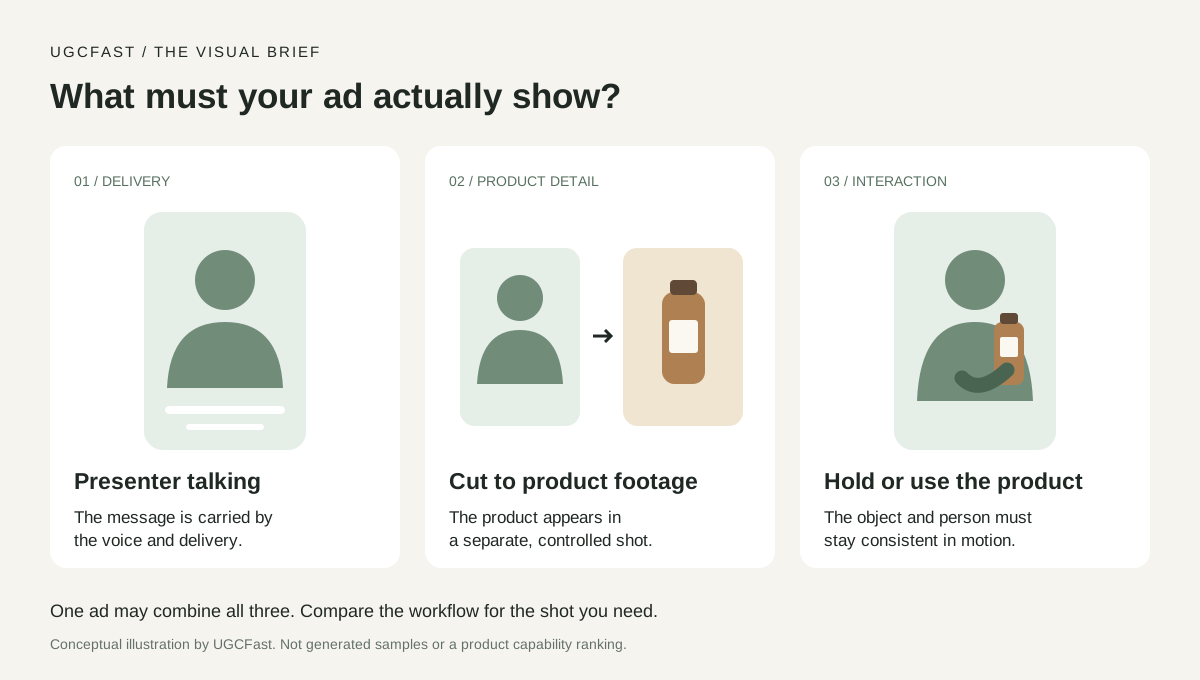
| Shot | What the viewer sees | What you need to establish |
|---|---|---|
| Presenter talking | A person speaking to camera | The delivery suits your message and audience. |
| Presenter + product footage | A speaker followed by a product close-up, overlay or screen recording | The product footage is accurate and the edit connects it to the spoken claim. |
| Presenter holding or using a product | A person interacting with the item inside the scene | The product, hands and action remain correct throughout the moving shot. |
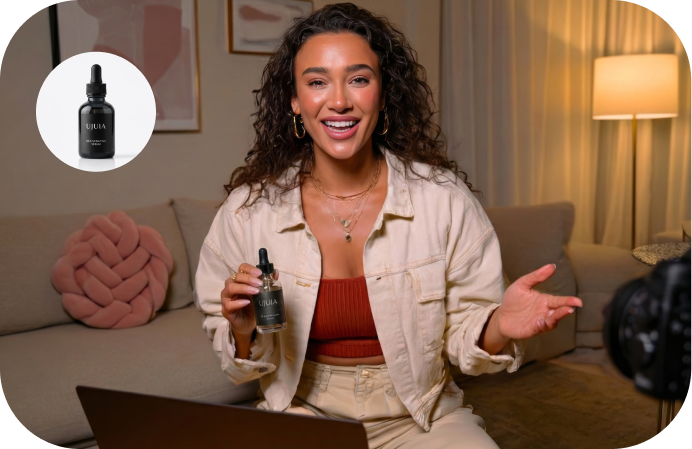
Look at the distinction: the inset displays a product image; the main scene places the bottle in the presenter’s hand. This is a HeyGen marketing illustration, not a continuity test or a guarantee for your product.
A still image can show a pose. It cannot tell you whether a cap opens correctly, a label stays readable, or a hand moves naturally. When physical interaction matters, look for a complete moving example of that action.
Useful shortcut: if your ad needs to show how a mechanism actually works, bring an accurate close-up or screen recording into the brief. Then compare how easily each workflow combines it with the presenter.
Compare the workflows
Creatify — start with a product page and build variations
Bring: a product URL and a clear offer.
Creatify documents extracting information and media from a product page, generating ad variations in batch, and editing elements such as scripts, avatars, captions and B-roll. That makes it a candidate when your first task is converting a listing into several creative directions.
The decision: prioritize this workflow if collecting assets and assembling first drafts is the work you want to reduce. Keep reviewing the extracted product details; a listing can contain several variants or offers.
The unresolved question: whether your required product interaction works in the selected generation mode. URL import alone does not establish that.
Explore the official features and demos · Open the URL-to-video workflow
Arcads — make presenter choice part of the creative process
Bring: the message and a brief for who should deliver it.
Arcads advertises an actor library, custom actor creation and product-holding scenes. Its current site also presents broader generation and refinement tools. Describing it as only a talking-head generator would miss that wider scope.
The decision: shortlist it when casting is a central creative choice. Compare the actor’s delivery against the tone you want, rather than choosing on library size alone.
The unresolved question: which mode and subscription include your exact actor, product scene and editing requirements. Some editing content on the page is marked “Soon,” so a feature headline needs a second look.
View the official actor and workflow demonstrations
HeyGen — build around multilingual presenter content
Bring: an approved message and the markets you need to reach.
HeyGen’s UGC page documents script-based presenter creation and multilingual delivery. It also shows product-oriented creative, so “corporate videos only” would be an unhelpful label.
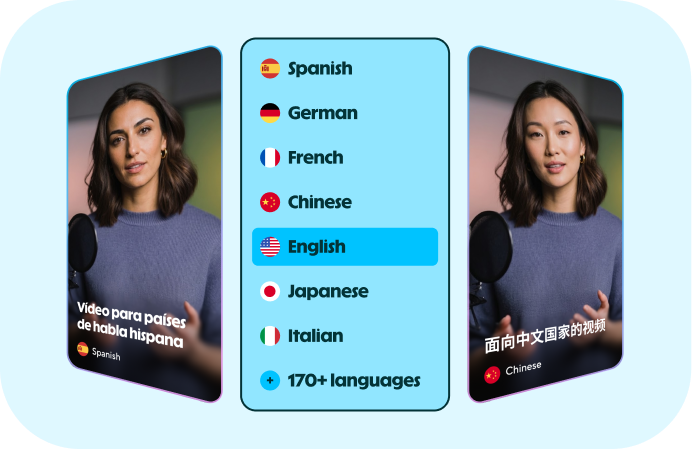
Official illustration: language selection is one part of localization. Your offer, captions and product terminology also need to match the market. Source and demonstrations.
The decision: consider it when producing several language versions is a substantial part of the job.
The unresolved question: how the selected workflow handles your brand pronunciation, translated captions and market-specific edits. A language count does not establish quality in each language.
VEED — combine generation with hands-on editing
Bring: a script, plus product clips or screen recordings you want to keep.
VEED describes a workflow in which you generate presenter content, then use the editor to add product footage, captions, brand elements and CTAs.
The decision: this is a useful candidate when you already know which product shots should appear and want to shape their timing. Think of an app ad that cuts from the presenter to the actual interface, or a kitchen-tool ad with a real close-up of the mechanism.
The trade-off: someone still needs to make those editing decisions. This route suits a team that wants that control.
Watch the official demo and read the editing steps
UGCFast — start with a short product-led draft
Bring: a product link, image or description, then choose a presenter.
Our public workflow describes product input, presenter selection and vertical video export. The homepage lists a one-time $1 temporary credit valid for seven days, with no automatic subscription renewal.
The decision: consider UGCFast if you want to explore a short product-ad draft before committing to a subscription.
The limits to notice: Starter lists 8- and 15-second, 720p generation. Product-in-hand is listed under Growth; 1080p is listed under Pro. A requirement for longer uninterrupted delivery or a specific resolution changes the shortlist.
Inspect UGCFast’s workflow, examples and current plans
One product, three different briefs
Imagine you sell a reusable bottle. The following are planning examples, not generated results.
| What your ad needs to do | A practical shot sequence | What to compare |
|---|---|---|
| Introduce the bottle’s shape and colors | Presenter opening → accurate product photos → offer | Product import and control over the selected images |
| Show how the lid locks | Presenter opening → real close-up of the locking action → CTA | Importing footage, trimming and placing captions |
| Place the bottle in a lifestyle scene | Presenter holding the bottle → product detail → offer | Product-in-hand availability and continuity in a moving example |
The product is identical. The work is different.
For the second brief, a beautiful presenter does not answer the most important question: can the viewer clearly see how the lock works? For the third, a static packshot does not answer whether the generated bottle keeps its shape during movement.
This is the comparison to make before counting avatars or subscription credits.
What a public demo can—and cannot—tell you
Use official demonstrations to narrow your shortlist without buying every subscription. Give each example a specific viewing task.
| Look for | You can learn | You cannot conclude |
|---|---|---|
| Input or setup screen | What the shown workflow asks you to supply | Every available setting or plan entitlement |
| Full video with sound | What that particular example looks and sounds like | Typical quality, first-attempt success or render time |
| Product close-up | Whether the displayed product is readable in that shot | Reliability on your packaging or another action |
| Editing walkthrough | Which changes the demonstrated workflow exposes | Whether all changes are free on your plan |
Keep the comparisons fair: a vendor’s edited showreel and another tool’s unedited free preview are different kinds of evidence. Label them accordingly rather than awarding a realism score.
For every tool you keep, save one relevant demo link and one concrete reason it fits your brief. If the available demo never shows your essential action, record that as an open question—not as proof that the feature is absent.
Price the ad you need to finish
A low entry price is useful only if it includes the workflow you need.
Use this order:
- Choose the output: duration, resolution, aspect ratio and required product shots.
- Find the qualifying plan: confirm that your selected generation mode is included.
- Budget the edits: distinguish changing captions from regenerating a presenter or product scene.
- Include the remaining work: product footage, editing and language review where your brief needs them.
For example, UGCFast’s homepage currently places product-in-hand on the $99/month Growth plan, while Starter is $39/month. If holding the product is essential, the entry plan is not the relevant price comparison. Published plan details.
Avoid converting every vendor’s “credits” into an assumed number of finished ads. That requires each selected mode’s consumption rules and your own acceptance criteria.
Choose the workflow, then the subscription
Write one sentence before opening another pricing page:
“I already have ______. I need the tool to produce ______. I still want control over ______.”
A product page, a finished script and a folder of product footage are three different starting points. Once you name yours, the comparison becomes much smaller—and the reason to choose a tool becomes much clearer.
Sources and scope
Public pages reviewed on September 14, 2026: Creatify features, Arcads, HeyGen UGC, VEED UGC, and UGCFast.
The workflow matches and bottle examples are our editorial analysis. We have not measured comparative realism, success rates, generation times or advertising performance. The HeyGen images are local copies of official marketing illustrations, with source links retained beside each image. This article is maintained as a dated guide, not a benchmark.